LinkedIn profile picture guide
How to make a professional LinkedIn profile picture
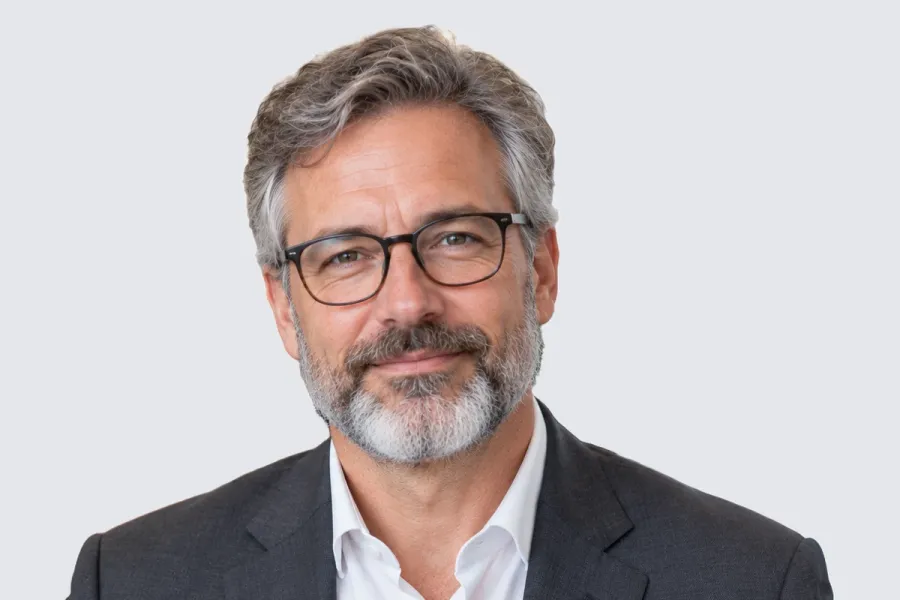
Upload a square photo of at least 400 × 400 px (LinkedIn accepts up to 7680 × 4320 px, PNG or JPG, up to 8 MB). LinkedIn's own advice: your face fills about 60% of the frame, you are the only person in it, and the background does not distract. A plain light grey or white behind you does that. AwaCut puts you on one from a photo you already have, offline.
2 computers per licence. Full refund within 14 days, no reason needed.

- Works offline
- No account, no uploads
- As many photos as you want, all year
Listed onAlternativeToMicrosoft Store
Pick a sharp photo where you look like you
Soft daylight, eyes to the camera, what you would wear to work. A phone photo is enough: the background is about to go.
Cut yourself out with AwaCut
Drop the photo into AwaCut and choose Custom, then type a colour such as #E5E7EB, a light grey. You get the same photo on a plain background, at its full size, in about 4 seconds on a Mac Studio (M4 Max). For a whole team, drop the folder.
Crop square and upload
Crop so your face fills about 60% of the square. On a computer: Me, then View Profile, then click your photo to change it, and Save. In the app: tap your photo, then View Profile, then Edit.

The finished LinkedIn photo
The AwaCut cutout on light grey (Custom, #E5E7EB), cropped square around the head and shoulders. Nothing else changed: same light, same suit, same face.
Check it small

The same picture as a circle at 110 px, about the size on a profile page, and at 40 px, the size beside a comment or a message. The face still reads at both, because it fills the frame and the background is plain.
LinkedIn profile picture size and rules in 2026
Size
- LinkedIn's rule
- 400 × 400 px up to 7680 × 4320 px
- What to do
- Upload at least 1080 × 1080 so it stays sharp on large screens.
File size
- LinkedIn's rule
- Up to 8 MB
- What to do
- A full-size JPG fits easily.
File type
- LinkedIn's rule
- PNG or JPG (no GIF)
- What to do
- JPG for a photo, PNG if you want a lossless file.
Face
- LinkedIn's rule
- About 60% of the frame (LinkedIn's advice)
- What to do
- Crop to head and shoulders.
Background
- LinkedIn's rule
- Nothing distracting (LinkedIn's advice)
- What to do
- Plain light grey, white or a calm brand colour.
Your cutout (AwaCut)
- LinkedIn's rule
- Keeps the photo's own size
- What to do
- A 12 MP phone photo is about 4000 × 3000, far above any profile size.
| What | LinkedIn's rule | What to do |
|---|---|---|
| Size | 400 × 400 px up to 7680 × 4320 px | Upload at least 1080 × 1080 so it stays sharp on large screens. |
| File size | Up to 8 MB | A full-size JPG fits easily. |
| File type | PNG or JPG (no GIF) | JPG for a photo, PNG if you want a lossless file. |
| Face | About 60% of the frame (LinkedIn's advice) | Crop to head and shoulders. |
| Background | Nothing distracting (LinkedIn's advice) | Plain light grey, white or a calm brand colour. |
| Your cutout (AwaCut) | Keeps the photo's own size | A 12 MP phone photo is about 4000 × 3000, far above any profile size. |
Source: LinkedIn Help (“Photo won't upload to your profile”) and LinkedIn's blog on profile pictures, read on 25 October 2026.
Three mistakes on LinkedIn photos
A busy background
Shelves, a street, other people behind you: the eye goes there instead of your face. Plain wins.
The face too small
A full-body or holiday shot turns into a dot in a circle. Crop to head and shoulders.
A photo that does not look like you
LinkedIn advises a photo that looks like you. The people who view your profile may meet you in person.
A whole team on the same background
When a company wants every LinkedIn photo to match, the usual answer is a photographer for a day. Collect everyone's best photo instead, drop the folder into AwaCut, set one Custom colour, and every face comes back on the same background. It runs on your computer, so staff photos never go to a server, and there are no credits: as many photos as you want, all year.
Try it on your own photos: the first 10 are free, no account.
2 computers per licence. Full refund within 14 days, no reason needed.
Frequently asked questions
What size is a LinkedIn profile picture?
LinkedIn accepts images from 400 × 400 px up to 7680 × 4320 px, as PNG or JPG, up to 8 MB. Upload a square of at least 1080 × 1080 px so it stays sharp.
What is the best background for a LinkedIn profile picture?
A plain one: light grey, white, or a calm colour that suits your field. LinkedIn's own advice is to avoid distracting backgrounds.
Do I need a professional photoshoot for LinkedIn?
No. A sharp phone photo in soft daylight, cropped to head and shoulders and put on a plain background, does the job most photoshoots are booked for.
How do I change my LinkedIn profile picture?
On a computer, click Me, then View Profile, then your photo, and choose a new one; then Save. In the app, tap your photo, then View Profile, then Edit.
How do I change the background of my LinkedIn profile picture?
Drop the photo into AwaCut and choose Custom to put yourself on a plain colour, or White, or Alpha for a transparent PNG. It runs offline on Mac, Windows and Linux.
A clean profile picture, from the photo you already have
The first 10 photos are free on each computer, with no account and no card. Then one yearly licence for as many photos as you want.
macOS
macOS 13.4+ (Apple silicon)
v1.0.6 · 194 MB
macOSBackground remover for MacWindows
Windows 10 or 11 (64-bit)
v1.0.6 · 180 MB
WindowsBackground remover for WindowsLinux
AppImage (x86-64)
v1.0.6 · 268 MB
LinuxBackground remover for Linux
Signed by AYA MIM S.R.L. If Windows still shows "Windows protected your PC", click More info, then Run anyway.
No AwaCut account. No credits. No uploads. 2 computers per licence, full refund within 14 days.