remove.bg Desktop alternative
remove.bg Desktop alternative: the same folder workflow, on your own computer
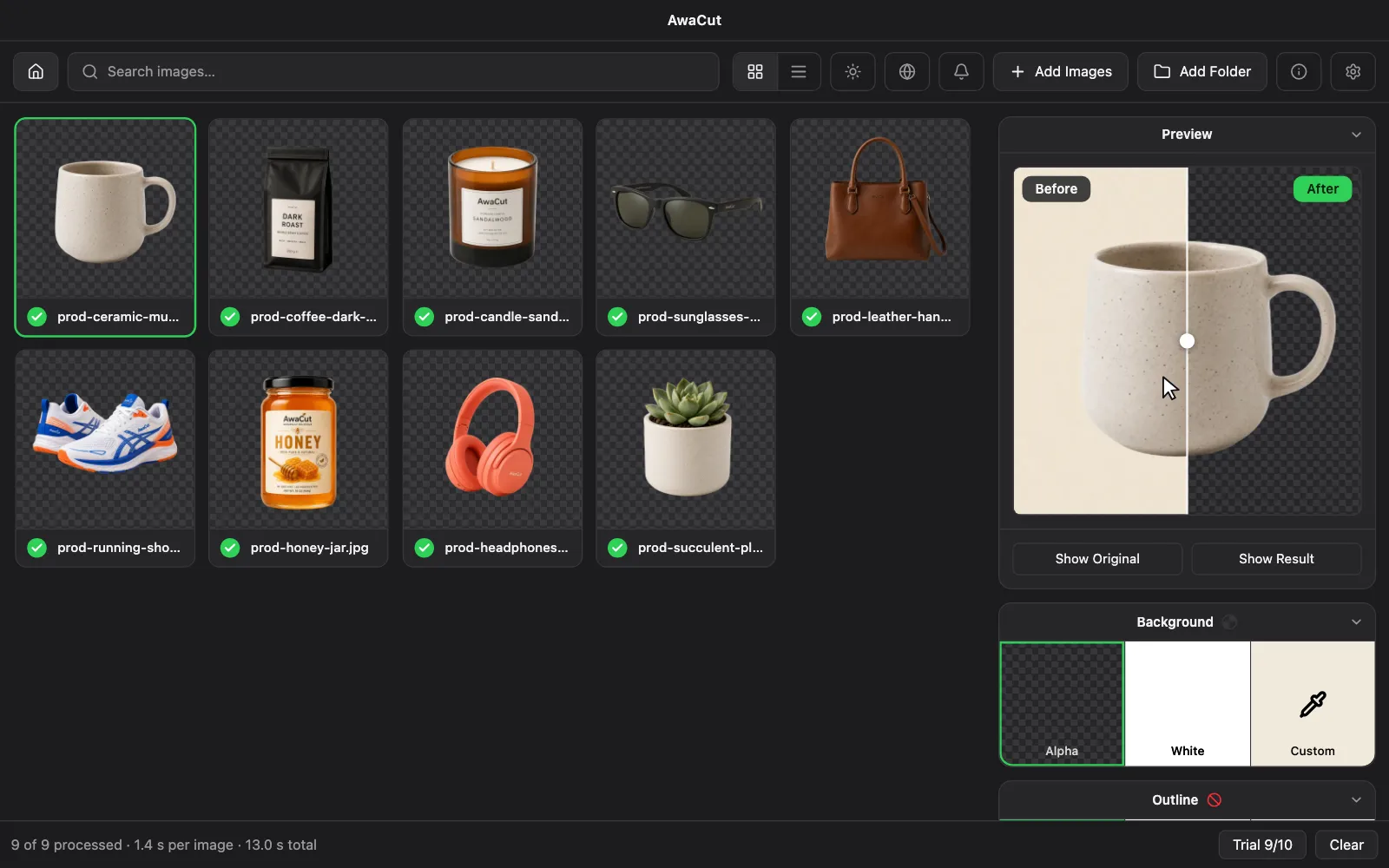
AwaCut keeps the remove.bg Desktop workflow on your own computer: drop a whole folder, pick one background, export. It runs on Windows, macOS and Linux, with no API key, no credits and no upload. remove.bg closes on 1 December 2026 and sends desktop users to Canva, which takes 50 images per folder and returns at most 10 megapixels.
- Works offline
- No account, no uploads
- Unlimited photos, flat price
Listed onAlternativeToMicrosoft Store
Export what you still need from remove.bg
Download your invoices and credit report before 1 December 2026, 09:00 CET. After that the account is gone.
Install AwaCut on the same computer
Windows 10 or later, macOS 13.4 or later on Apple Silicon, or Linux (AppImage, x86-64). The first 10 photos are free, at full resolution, with no account.
Drop the folder you used to drop into remove.bg
Pick Alpha, White or a Custom colour once for the whole folder, then export PNG, WebP or JPG at the original size, about 4 seconds a photo.
Your remove.bg Desktop settings, in AwaCut
| What you did | remove.bg Desktop | AwaCut |
|---|---|---|
| Drop a batch | Images or whole folders, unlimited files | Whole folders, every photo queues on its own |
| One background for all | A background colour applied to every image | Alpha (transparent), White or any Custom colour, one setting per folder |
| Output size | Auto, Full (up to 50 megapixels) or Preview | Always the original size of the photo |
| File format | PNG, JPG or PSD | PNG, WebP or JPG. No PSD |
| Where the cut happens | On remove.bg's servers, through the API: internet and an API key | On your computer: no internet needed to process, no account |
| How you pay | Credits per image; free: 50 previews a month at 0.25 megapixels | $29 a year, as many photos as you want; 10 free at full resolution |
| Extras | AI Shadow, design templates | Not in AwaCut. Outline adds a border around the cutout |
remove.bg Desktop as its own product page and desktop help describe it, read on 14 October 2026. Canva's limits from Canva's Help Center, October 2026.
What your remove.bg volume costs on AwaCut
remove.bg's cheapest published plan for each volume, against one flat licence for any number of photos.
100 photos a month
remove.bg
€399
AwaCut
$29
a year
500 photos a month
remove.bg
€961
AwaCut
$29
a year
1,000 photos a month
remove.bg
€2,041
AwaCut
$29
a year
remove.bg prices as its pricing page showed them from the EU on 8 September 2026, cheapest plan for each volume. The full table for 29 tools is further down.
Three things to get right before 1 December
Waiting for the last day
Invoices and the credit usage report can only be downloaded while the account exists. Sellers need them for their books, so export them now.
Buying credits now
remove.bg says unused pay-as-you-go credits expire when the service closes. Buy only what you will use before 1 December.
Expecting Canva to read your folders
Canva works on images you upload to it, 50 per folder, one folder at a time, and needs a paid plan. If your workflow starts from a folder on your disk, a desktop app keeps it that way.
Why a desktop app is still the right tool here
If you used remove.bg Desktop, your photos already live in folders on your computer and you process them in batches. AwaCut does exactly that, without sending the photos anywhere: no upload, no queue on a server, no credits to count. A folder of 500 phone photos takes about 32 minutes, at the original resolution.
Frequently asked questions
Is remove.bg Desktop going away?
remove.bg's FAQ says its standalone website and accounts stop on 1 December 2026, 09:00 CET, and answers the desktop question with "Canva's bulk background removal covers it." The desktop app ran through the remove.bg API with an API key and credits.
Is there an offline alternative to remove.bg Desktop?
Yes. AwaCut runs the background removal on your own computer, so processing needs no internet and photos are never uploaded. remove.bg Desktop itself needed an internet connection for every image.
Does AwaCut run on Linux and on Intel Macs?
Linux, yes: an AppImage for x86-64. On a Mac it needs macOS 13.4 or later on Apple Silicon (M1 or newer); Intel Macs are not supported. On Windows, Windows 10 or later. One licence covers 2 computers.
What does AwaCut not replace?
PSD export, AI Shadow, design templates, the API and the Photoshop, Figma or GIMP plugins. AwaCut is a desktop app for cutting out whole folders: transparent, white or a colour, at the original size.
What does it cost after remove.bg credits?
$29 a year, flat: as many photos as you want, with no credits and no watermark. If you cancel, the app keeps working on the version you have.
Try it on the folder you would have sent to remove.bg
The first 10 photos are free, at full resolution, with no account and no watermark.
macOS
macOS 13.4+ (Apple Silicon)
v1.0.6 · 194 MB
macOSBackground remover for MacWindows
Windows 10+
v1.0.6 · 180 MB
WindowsBackground remover for WindowsLinux
AppImage (x86-64)
v1.0.6 · 268 MB
LinuxBackground remover for Linux
Signed by AYA MIM S.R.L. If Windows still shows "Windows protected your PC", click More info, then Run anyway.
No AwaCut account. No credits. No uploads.