
2026

The best bulk background removers in 2026

Software that removes the background from hundreds of product photos in one run comes in three kinds. A desktop app that takes a whole folder and works on your own computer: AwaCut, about 32 minutes for 500 phone photos on a Mac Studio (M4 Max), offline, $29 a year for as many photos as you want, all year.

A cloud service with an API and a price per image: remove.bg. A subscription suite with batch upload on the web or on a phone: Photoroom or Pixelcut.

Try 10 photos free

Or buy now: $29/year

2 computers per licence. Full refund within 14 days, no reason needed.

We make AwaCut, one of the tools below. Every claim here is dated and checkable on the linked pages, and each tool gets credit for what it does best. Spot something outdated? Write to us and we will correct it.

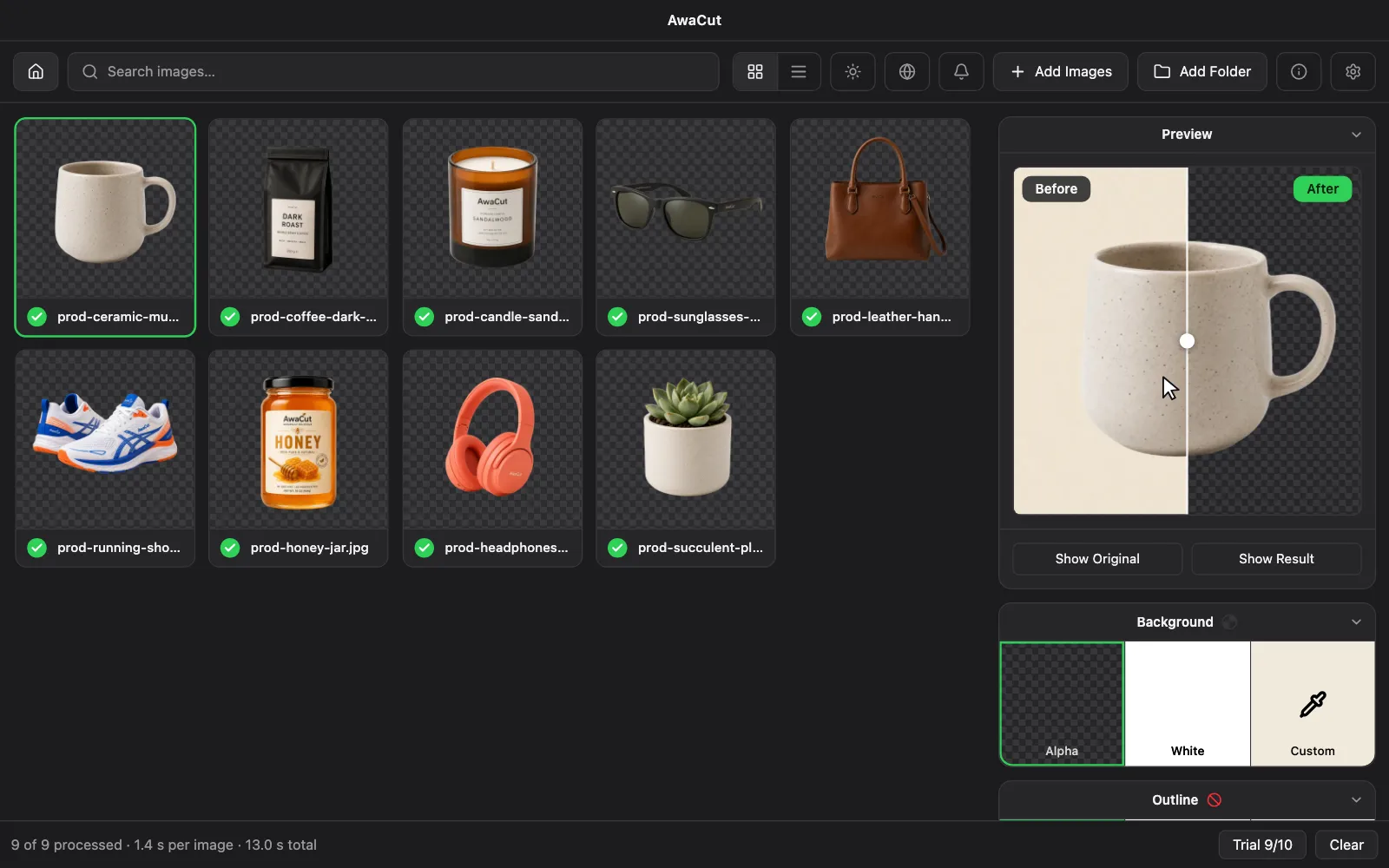
The AwaCut desktop app with a finished batch of product photos and a before/after preview
  • Works offline
  • No account, no uploads
  • As many photos as you want, all year

Listed onAlternativeToMicrosoft Store

There are more bulk background removers than ever, and they differ less in AI quality than in how they run and how they charge: in the cloud or on your computer, per image or flat. We walked every tool on the first five Google pages for this exact search in July 2026; these are the ones worth your time, grouped by what they are best at.

remove.bg closes on 1 December 2026. Its FAQ sends users to Canva, whose background remover takes 50 images per folder and returns at most 10 megapixels (Canva Help Center, October 2026). remove.bg is closing: alternatives

The short answers

  • Best for bulk on a desktop, at a flat price: AwaCut (ours). As many photos as you want, offline, $29 a year.

  • Best-known brand: remove.bg. Excellent quality, credits per image, from EUR 0.07 to EUR 1.00 each (EU prices, September 2026). Its standalone service closes on 1 December 2026.

  • Best for mobile-first sellers: Photoroom or Pixelcut: subscription suites with strong apps.

  • Best for studio photographers: Evoto: desktop retouching suite with batch background tools, on credits.

  • Best free options for a handful of images: in-browser tools like remove-bg.io or Pixlr's free tier.

ToolRunsPricing modelOffline
AwaCutDesktop app (on-device)$29 a year, as many photos as you wantYes
remove.bgWeb + desktop client (closes 1 Dec 2026)Credits: each full-size image uses a creditNo
PhotoroomWebSubscription plansNo
SlazzerWeb + desktop clientCredits: each full-size image uses a creditNo
EvotoDesktop app (on-device)Credits: each full-size image uses a creditNo
PixelcutWebSubscription plansNo
insMindWebSubscription plansNo
remove-bg.io, Pixlr…In-browser (on-device)FreemiumNo
Adobe PhotoshopDesktop app (on-device)Subscription plansYes

1. AwaCut

AwaCut (ours): a desktop app for Mac (Apple silicon), Windows and Linux that processes whole folders locally with BiRefNet, an open segmentation model, and applies the cut to the full-resolution photo. As many photos as you want for $29 a year, and photos never leave the computer. If you stop renewing, the app keeps working; only updates stop. The trade-off: no phone app and no cloud collaboration. It is built for one job on your own machine.

Try 10 photos free

Or buy now: $29/year

2 computers per licence. Full refund within 14 days, no reason needed.

2. remove.bg

remove.bg (Canva): the category's reference brand, with the largest ecosystem: API, Photoshop plugin, integrations. Quality on hair and fine edges is excellent. Batch editing exists but every image spends credits: EU pricing runs from EUR 0.07 per image on the largest plan to EUR 1.00 pay-as-you-go (their published prices, September 2026). Its standalone service closes on 1 December 2026 and moves into Canva. Until then, it is best when you need integrations more than volume.

remove.bgAwaCut vs remove.bg →What 1,000 removals cost →

3. Photoroom

Photoroom: a polished subscription suite loved by mobile-first sellers, with AI backgrounds and templates well beyond plain removal. Bulk runs in the cloud on paid plans. Best if you edit on your phone and want listing graphics, not just cutouts.

photoroom.comAwaCut vs Photoroom →

4. Slazzer

Slazzer: the closest thing to a desktop rival: real Windows, Mac and Linux apps that batch-process folders. The catch is architectural: the apps are clients for Slazzer's API, so processing needs an internet connection and consumes credits. Best if you want a desktop workflow and do not mind metered pricing.

slazzer.comAwaCut vs Slazzer →

5. Evoto

Evoto: a desktop AI retouching suite aimed at portrait and studio photographers, with bulk background replacement among many tools. Credit-based. Best if backgrounds are one step in a bigger retouching pipeline.

evoto.aiAwaCut vs Evoto →

6. Pixelcut

Pixelcut: mobile-first background removal and product-shot suite with a growing web app and a dedicated bulk tool, on subscription. Best for sellers who shoot and list from a phone.

pixelcut.aiAwaCut vs Pixelcut →

7. insMind

insMind: a fast-growing web suite with a capable free tier and a dedicated bulk page. Cloud processing, freemium limits. A reasonable pick for occasional batches if you are comfortable uploading your photos.

insmind.comAwaCut vs insMind →

8. remove-bg.io, Pixlr…

In-browser tools (remove-bg.io, Pixlr and friends): free tools that work in your browser tab. remove-bg.io runs the model inside the tab, so photos stay on your device. Useful for a handful of images; browser memory and smaller models are the limit, so quality and batch size drop on large folders. Best for quick one-off jobs.

AwaCut vs remove-bg.io →

9. Adobe Photoshop

Adobe Photoshop: the incumbent every seller already knows. It removes backgrounds superbly, runs locally like AwaCut, and can be automated with actions and scripts if you set that up. The cost counted here is the subscription alone (EUR 26.43/month incl. VAT, Romanian page, September 2026); setting up batch actions takes time.

adobe.com/products/photoshop.htmlAwaCut vs Adobe Photoshop →

See all 12 tools compared on price, privacy and offline use → · Open-source background removers →

Checked between July and October 2026 against each tool's published pages; each price shows its own date. The vendor's own site is always the final word. Spotted something outdated? Tell us and we will correct it: contact@aya.software
Frequently asked questions

What is the best bulk background remover?

It depends on where you work. On a desktop with large batches, AwaCut (which we make) processes as many photos as you want, offline, for $29 a year. remove.bg is the best-known name, with credits per image, until its standalone service closes on 1 December 2026. On a phone, Photoroom or Pixelcut fit better.

What is the cheapest way to remove backgrounds from many photos?

At 500 photos a month, remove.bg's 500-credit plan costs EUR 89 a month, about EUR 961 a year even with the 10% yearly discount. AwaCut is $29 a year for as many photos as you want. For just a few images, free in-browser tools are the cheapest option. The full sum is on our page about what 1,000 removals cost.

Can I remove backgrounds in bulk without an internet connection?

Only with software that ships the AI model inside the app. AwaCut processes fully offline on macOS, Windows and Linux. Cloud tools and browser tools need a connection; desktop clients tied to an API, like Slazzer's, do too.

Do bulk background removers upload my photos?

Cloud tools do: your images are processed on their servers under their privacy policies. Two exceptions exist: in-browser tools that run on-device in the tab, and desktop software like AwaCut, where photos never leave your computer at all.

What software removes backgrounds from hundreds of product images automatically?

Any tool with batch processing will, and the difference is where the work happens and what it costs at that volume. AwaCut (ours) takes a folder of 500 phone photos and returns transparent PNGs about 32 minutes later on a Mac Studio (M4 Max), with no upload and no credits: $29 a year, as many photos as you want, all year. remove.bg does it in the browser or through its API, on credits per image, until it closes on 1 December 2026. Photoroom and Pixelcut batch on the web and on phones, on a subscription. For hundreds of images a month, flat pricing on a desktop is the cheapest; for a few dozen, a free in-browser tool is enough.

Try it on your own photos

Download AwaCut and cut out 10 photos free. No account, no card, no watermark. Compare the cutouts yourself.

  1. macOS

    macOS 13.4+ (Apple silicon)

    v1.0.6 · 194 MB

    macOSBackground remover for Mac
  2. Windows

    Windows 10 or 11 (64-bit)

    v1.0.6 · 180 MB

    WindowsBackground remover for Windows
  3. Linux

    AppImage (x86-64)

    v1.0.6 · 268 MB

    LinuxBackground remover for Linux

Signed by AYA MIM S.R.L. If Windows still shows "Windows protected your PC", click More info, then Run anyway.

Buy AwaCut for $29/year

No AwaCut account. No credits. No uploads. 2 computers per licence, full refund within 14 days.

AwaCut runs on your computer

It is a desktop app for Mac, Windows and Linux, so it does not install on a phone. Send yourself the link and open it on your computer.

Privacy Policy