Instagram carousel guide
Instagram carousel: size, ratio and slides that match
A carousel post holds up to 20 photos and videos, and the orientation you pick (square, portrait or landscape) applies to all of them. Make every slide the same size, 1080 × 1350 px (4:5) for the most room. Slides that share one background colour read as one set. AwaCut puts every product on the same colour at once, offline.
2 computers per licence. Full refund within 14 days, no reason needed.

- Works offline
- No account, no uploads
- As many photos as you want, all year
Listed onAlternativeToMicrosoft Store
Cut every product out with AwaCut
Drop the photo, or a whole folder, into AwaCut. Choose Alpha for a transparent PNG, or Custom and type a colour such as #FCE7F3 to get it on a plain background straight away. About 4 seconds a photo on a Mac Studio (M4 Max), at full size.
Make the slides one size
Three to ten 1080 × 1350 canvases, the same colour, the product in the same place on each, a short title at the top and the slide number at the bottom.
Post them together
On a computer: Create, Post, Select from computer, choose up to 20, put them in order, then Next and Share. The orientation you choose applies to all of them.
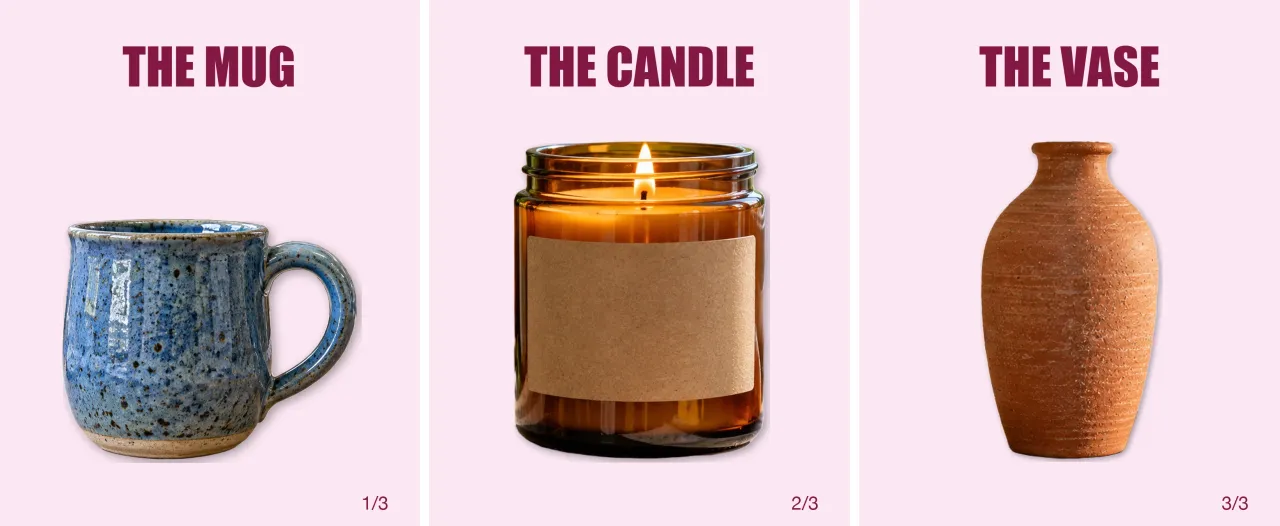
The finished carousel
Three 1080 × 1350 slides on one pale pink (Custom, #FCE7F3): mug, candle, vase, each cut out by AwaCut, same headline style, numbered.
Check the first slide
Only the first slide shows in the feed and the grid. Make it the one that earns the swipe.
Instagram carousel size in 2026
Slides
- What Instagram says
- Up to 20 photos and videos in one post
- What to do
- Three to ten is plenty.
Orientation
- What Instagram says
- One for the whole post (square, portrait or landscape)
- What to do
- Make every slide the same size.
Size
- What Instagram says
- 1080 px wide, up to 4:5 (newer help: 3:4)
- What to do
- 1080 × 1350 for every slide.
Your cutout (AwaCut)
- What Instagram says
- Keeps the photo's own size
- What to do
- Cut out every product in one drop.
| What | What Instagram says | What to do |
|---|---|---|
| Slides | Up to 20 photos and videos in one post | Three to ten is plenty. |
| Orientation | One for the whole post (square, portrait or landscape) | Make every slide the same size. |
| Size | 1080 px wide, up to 4:5 (newer help: 3:4) | 1080 × 1350 for every slide. |
| Your cutout (AwaCut) | Keeps the photo's own size | Cut out every product in one drop. |
Source: Instagram Help Center (“Share a post with multiple photos or videos”, image resolution), read on 25 October 2026.
Three mistakes on carousels
Slides of different sizes
Instagram applies one orientation to all; the odd ones get cropped.
Every slide a different background
A set reads as a set when the background repeats.
A weak first slide
It is the only one people see before swiping.
Why one colour sells a set
A carousel of products on one colour looks like a catalogue page. AwaCut cuts out a whole folder at once, so a week of posts is one drop, not one upload per photo. It runs on your computer, with no credits: as many photos as you want, all year.
Try it on your own photos: the first 10 are free, no account.
2 computers per licence. Full refund within 14 days, no reason needed.
Frequently asked questions
How many photos can an Instagram carousel have?
Instagram's help says up to 20 photos and videos in one post.
What size are Instagram carousel slides?
1080 px wide; 1080 × 1350 (4:5) gives the most room. The orientation of the post applies to every slide.
Can carousel slides have different sizes?
No. The orientation you choose affects all photos and videos in the post.
How do I cut out a person or a product for a social media image?
Drop the photo into AwaCut and choose Alpha for a transparent PNG to place on your design, or Custom to put it straight on a colour. It runs offline on Mac, Windows and Linux.
Cut out every photo for your next posts
The first 10 photos are free on each computer, with no account and no card. Then one yearly licence for as many photos as you want.
macOS
macOS 13.4+ (Apple silicon)
v1.0.6 · 194 MB
macOSBackground remover for MacWindows
Windows 10 or 11 (64-bit)
v1.0.6 · 180 MB
WindowsBackground remover for WindowsLinux
AppImage (x86-64)
v1.0.6 · 268 MB
LinuxBackground remover for Linux
Signed by AYA MIM S.R.L. If Windows still shows "Windows protected your PC", click More info, then Run anyway.
No AwaCut account. No credits. No uploads. 2 computers per licence, full refund within 14 days.