Remove background from a folder
Remove the background from a whole folder of images
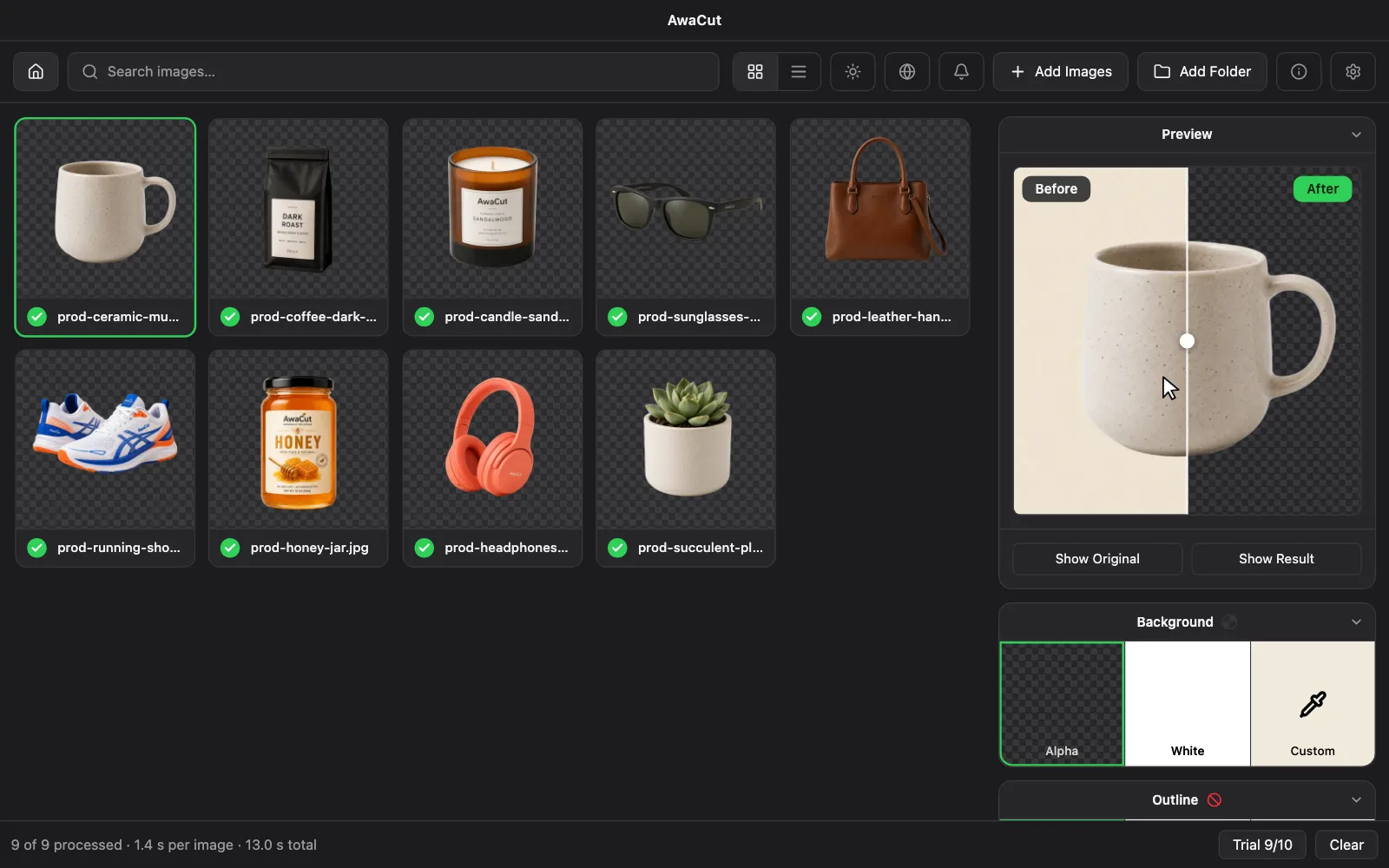
Drop the folder on AwaCut. It finds every image inside, subfolders included, cuts them all on your computer and saves the results to one separate folder, each at its original size and with its original file name. It runs on Windows, Mac and Linux with no upload and no credits: 10 photos free, then $29 a year for as many as you want.
2 computers per licence. Full refund within 14 days, no reason needed.
- Subfolders included
- Original size and file names
- Saved to a separate folder
Listed onAlternativeToMicrosoft Store
Drag the folder onto AwaCut
It finds the JPG, PNG, WebP, BMP and TIFF files inside, plus HEIC on a Mac, and skips everything else. Subfolders count too.
Pick one look for the whole folder
Alpha for transparent, White, or any colour. Then PNG, WebP or JPG. JPG has no transparency, so it needs White or a colour.
Let it run
Each cutout is saved as soon as it is ready, to Pictures/AwaCut/Cutouts unless you choose another folder. Change the background later and the finished photos are saved again, with no need to cut them twice.
Ways to cut a whole folder, side by side
AwaCut
- How it works
- Drag the folder onto the app. Windows, Mac and Linux.
- Good to know
- Offline, subfolders included, original size. 10 photos free, then $29 a year for as many as you want.
Photoshop
- How it works
- Record an action with Remove Background, then run File, Automate, Batch on the folder.
- Good to know
- Local and with the most control afterwards, but you build the action yourself and need a subscription.
rembg
- How it works
- One command: rembg p input output.
- Good to know
- Free and open source. Needs Python or its command-line installer. Best if you are comfortable in a terminal.
Finder on a Mac
- How it works
- Select the images, right-click, Quick Actions, Remove Background.
- Good to know
- Free and built in, with no settings. Transparent only, and the results land beside the originals.
Canva
- How it works
- Upload the images and use bulk background removal.
- Good to know
- Needs a paid plan and an internet connection. At most 50 images per folder, and photos over 10 MP come back at 10 MP.
Online batch tools
- How it works
- Upload the images and download the results.
- Good to know
- Nothing to install, but every photo is uploaded, and most plans count credits or exports.
| Way | How it works | Good to know |
|---|---|---|
| AwaCut | Drag the folder onto the app. Windows, Mac and Linux. | Offline, subfolders included, original size. 10 photos free, then $29 a year for as many as you want. |
| Photoshop | Record an action with Remove Background, then run File, Automate, Batch on the folder. | Local and with the most control afterwards, but you build the action yourself and need a subscription. |
| rembg | One command: rembg p input output. | Free and open source. Needs Python or its command-line installer. Best if you are comfortable in a terminal. |
| Finder on a Mac | Select the images, right-click, Quick Actions, Remove Background. | Free and built in, with no settings. Transparent only, and the results land beside the originals. |
| Canva | Upload the images and use bulk background removal. | Needs a paid plan and an internet connection. At most 50 images per folder, and photos over 10 MP come back at 10 MP. |
| Online batch tools | Upload the images and download the results. | Nothing to install, but every photo is uploaded, and most plans count credits or exports. |
Canva's limits from Canva's Help Center, October 2026; the others from each tool's own pages, read on 31 October 2026. We make AwaCut.
Three things that go wrong with a folder run
Testing on easy photos
One clean product shot proves little. Before you commit, try your hardest photos: hair, glass, a subject the same colour as its background. AwaCut's 10 free photos are at full resolution, so use them on those.
Saving over the originals
Some batch setups write back into the folder they read from. Send the results to a different folder. AwaCut does this by default: it saves to Pictures/AwaCut/Cutouts unless you choose another.
Assuming every photo came out right
No AI gets every edge right. After a run, scan the results and fix the few that need it. In AwaCut, click any finished file to compare Before and After.
Why a folder is easier than a queue of uploads
Your photos are already on your disk, sorted the way you want them. Keeping the job there means no upload limit, no download to unzip, and nothing to rename, because each file keeps its name.
Try it on your own photos: the first 10 are free, no account.
2 computers per licence. Full refund within 14 days, no reason needed.
Frequently asked questions
How do I remove the background from a whole folder of images?
Drag the folder onto AwaCut and pick a background. It cuts every image inside on your computer and saves each one with its original file name and size. It works on Windows, Mac and Linux. The first 10 photos are free.
Can I do this on Windows without Photoshop?
Yes. AwaCut does it from a window with no setup. rembg does it for free with one command if you are comfortable with Python, and BG Remove is a free Windows app that also takes folders.
Can I do this on a Mac without Photoshop?
Yes. For a few images, Finder's Quick Actions has a Remove Background command built in. For a whole folder with a choice of white or a colour, or subfolders, AwaCut runs on any Mac with Apple silicon and macOS 13.4 or newer.
Does it include subfolders?
Yes. Drop the top folder and AwaCut finds the images in the folders inside it too.
Do the files keep their names?
Yes. Each cutout keeps the source file name and the original width and height, so the batch can go straight back into your listings or catalog. Only the extension changes if you choose another format.
How many images can it handle?
There is no limit on the number of photos and no credits to count. The licence is $29 a year for as many as you want, and you can leave a big folder running while you do something else.
Does the folder get uploaded?
No. Everything runs on your computer. Your photos are never uploaded and never used to train AI, and removing backgrounds works with no internet.
Try it on a real folder
Drop in the folder you need done. The first 10 photos are free, at full resolution, with no account and no watermark.
macOS
macOS 13.4+ (Apple silicon)v1.0.7 · 186 MB
Windows
Windows 10 or 11 (64-bit)v1.0.7 · 176 MB
Linux
AppImage (x86-64)v1.0.7 · 263 MB
Signed by AYA MIM S.R.L. If Windows still shows "Windows protected your PC", click More info, then Run anyway.
No AwaCut account. No credits. No uploads. 2 computers per licence, full refund within 14 days.