Convert whole folders, offline
Batch image converter: a whole folder to JPG, PNG, WebP or JXL
To convert many images at once, use a batch converter on your own computer: drop the folder, pick the format, export. AwaCut's Convert Images reads JPG, PNG, WebP, AVIF, JPEG XL, TIFF and BMP on Mac, Windows and Linux, and HEIC on a Mac, and writes JPG, PNG, WebP or JXL. Nothing is uploaded, and the originals stay as they were. The first 10 photos are free.
2 computers per licence. Full refund within 14 days, no reason needed.

- No upload
- JPG, PNG, WebP or JXL out
- Mac, Windows and Linux
Listed onAlternativeToMicrosoft Store
Drop the folder
Open Convert Images in AwaCut and drop a folder, or single files. Mixed formats are fine: each file is read in its own format.
Pick the format
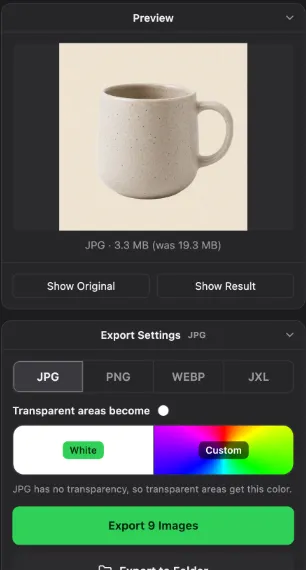
JPG for photos, PNG to keep every pixel and transparency, WebP for websites, JXL for the smallest files that keep full quality. For JPG, choose the colour transparent areas become.
Export
Every file is converted on your computer and written next to the others in the output folder, never over the original. The list shows each result as it is done.
Batch image converters compared
AwaCut (Convert Images)
- Runs on
- Mac, Windows, Linux
- Good to know
- Reads AVIF, JXL and HEIC (Mac). 10 photos free, then one licence with Remove Background
XnConvert
- Runs on
- Mac, Windows, Linux
- Good to know
- Free for private use, a licence for business. Many formats and actions
ImageMagick
- Runs on
- Mac, Windows, Linux
- Good to know
- Free and open source, command line
Preview
- Runs on
- Mac, built in
- Good to know
- Select many files, Export Selected Images. One format at a time
Online converters
- Runs on
- Browser
- Good to know
- Upload your files, usually with a limit per day or per file size
| Tool | Runs on | Good to know |
|---|---|---|
| AwaCut (Convert Images) | Mac, Windows, Linux | Reads AVIF, JXL and HEIC (Mac). 10 photos free, then one licence with Remove Background |
| XnConvert | Mac, Windows, Linux | Free for private use, a licence for business. Many formats and actions |
| ImageMagick | Mac, Windows, Linux | Free and open source, command line |
| Preview | Mac, built in | Select many files, Export Selected Images. One format at a time |
| Online converters | Browser | Upload your files, usually with a limit per day or per file size |
Checked November 2026.
Mistakes when converting many images
Converting over the originals
A batch run that writes over the source files leaves no way back. Write to a separate folder; AwaCut always does.
Turning photos into PNG
PNG keeps every pixel, so a photo as PNG is often several times larger than as JPG. Use PNG for cutouts, logos and screenshots.
Losing transparency in JPG
JPG has no transparent areas. Convert cutouts to PNG or WebP, or choose the colour they get on purpose.
Why convert on your own computer
Online converters are fine for one file. A folder of 400 product photos, or photos you should not upload, is quicker on your own computer: one drop, no daily limit, no waiting for uploads. Convert Images also reads the newer formats many tools still refuse, AVIF and JPEG XL, on all three systems.
Try it on your own photos: the first 10 are free, no account.
2 computers per licence. Full refund within 14 days, no reason needed.
Frequently asked questions
Which formats can AwaCut convert?
It reads JPG, PNG, WebP, AVIF, JPEG XL, TIFF and BMP on Mac, Windows and Linux, and HEIC on a Mac. It writes JPG, PNG, WebP or JPEG XL.
Is Convert Images free?
The first 10 photos are free on each computer, with no account. Then one yearly licence covers as many photos as you want, in Convert Images and in Remove Background. Compress Images and Find Duplicates stay free.
Is it a bulk image converter for whole folders with subfolders?
Yes. Drop the top folder; the photos in its subfolders come along.
Can it convert HEIC on Windows?
No. HEIC needs an HEVC decoder, which macOS has built in, so AwaCut reads HEIC on a Mac only. On Windows, Paint opens HEIC once the HEIF and HEVC extensions from the Microsoft Store are installed.
Is Convert Images also a transparent PNG converter?
No, it changes the format and keeps the background as it is. For a transparent PNG, use Remove Background: keep Alpha, pick PNG, and the background goes in the same run. Both tools take a whole folder.
Is there an image transparent converter for a whole folder?
Yes: Remove Background in AwaCut. Drop the folder, keep Alpha and every image comes out as PNG or WebP with a transparent background, offline. The first 10 photos are free, then one yearly licence covers as many photos as you want.
How do I convert images to WebP?
Drop the images or their folder on Convert Images, pick WebP and export. Transparent PNGs keep their transparency as WebP, and the originals stay as they were.
Convert your next folder of images
Convert Images has 10 free photos on each computer, then one yearly licence for as many photos as you want, with Remove Background included.
macOS
macOS 13.4+ (Apple silicon)v1.0.7 · 186 MB
Windows
Windows 10 or 11 (64-bit)v1.0.7 · 176 MB
Linux
AppImage (x86-64)v1.0.7 · 263 MB
Signed by AYA MIM S.R.L. If Windows still shows "Windows protected your PC", click More info, then Run anyway.
No AwaCut account. No credits. No uploads. 2 computers per licence, full refund within 14 days.