Convert WebP to JPG, free
WebP to JPG: three free ways, and a whole folder at once
To convert WebP to JPG for free, open the file in an app that reads WebP and export it. On a Mac, open it in Preview and choose File, Export, Format: JPEG or PNG. On Windows or Linux, open it in GIMP 3 and use File, Export As. Choose PNG instead of JPG when the image has transparent areas. For a whole folder, Convert Images in AwaCut converts every file at once, on Mac, Windows and Linux.
2 computers per licence. Full refund within 14 days, no reason needed.

- No upload
- JPG or PNG
- Mac, Windows and Linux
Listed onAlternativeToMicrosoft Store
Mac: Preview
Open the .webp file in Preview, choose File, Export and set Format to JPEG or PNG. Select several files in the sidebar first to export them together.
Windows and Linux: GIMP 3
Open the .webp in GIMP 3, choose File, Export As and type the new name ending in .jpg or .png. GIMP is free and runs on all three systems. On the command line: magick photo.webp photo.jpg (ImageMagick).
A whole folder: AwaCut
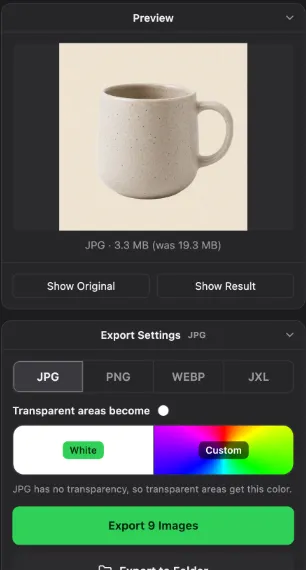
Drop the folder on Convert Images, pick JPG or PNG and export. For JPG, choose the colour transparent areas become: white or any colour you pick.
WebP to JPG and PNG converters
Preview
- Runs on
- Mac, built in
- Good to know
- Opens WebP, exports JPEG or PNG
GIMP 3
- Runs on
- Mac, Windows, Linux
- Good to know
- Free, one file at a time
ImageMagick
- Runs on
- Mac, Windows, Linux
- Good to know
- Free, command line, easy to loop over a folder
dwebp (libwebp)
- Runs on
- Mac, Windows, Linux
- Good to know
- Google's own tool. Writes PNG, not JPG
AwaCut (Convert Images)
- Runs on
- Mac, Windows, Linux
- Good to know
- Whole folders to JPG, PNG, WebP or JXL. 10 photos free, then a licence
| Tool | Runs on | Good to know |
|---|---|---|
| Preview | Mac, built in | Opens WebP, exports JPEG or PNG |
| GIMP 3 | Mac, Windows, Linux | Free, one file at a time |
| ImageMagick | Mac, Windows, Linux | Free, command line, easy to loop over a folder |
| dwebp (libwebp) | Mac, Windows, Linux | Google's own tool. Writes PNG, not JPG |
| AwaCut (Convert Images) | Mac, Windows, Linux | Whole folders to JPG, PNG, WebP or JXL. 10 photos free, then a licence |
An animated WebP becomes a still image in JPG or PNG. Checked November 2026.
Mistakes when converting WebP
Choosing JPG for a logo or a cutout
JPG has no transparency, so the transparent areas turn into a solid colour. Use PNG for anything with a transparent background.
Saving the image again from the browser
Right-click, Save image as on a website often gives you the same WebP again. Save it, then convert it.
Expecting a smaller file
WebP is usually smaller than JPG and much smaller than PNG. Convert because an app needs JPG or PNG, not to save space.
Why websites send you WebP
Most websites now serve images as WebP because the files are smaller and pages load faster. Browsers read WebP, but some editors, print shops, marketplaces and older apps still ask for JPG or PNG. A converted copy solves that; the WebP stays the smaller file for the web.
Try it on your own photos: the first 10 are free, no account.
2 computers per licence. Full refund within 14 days, no reason needed.
Frequently asked questions
How do I convert WebP to JPG on Windows?
Open the file in GIMP 3 (free) and choose File, Export As, photo.jpg. For many files, ImageMagick converts them from the command line, or drop the folder on Convert Images in AwaCut.
Should I convert WebP to JPG or to PNG?
JPG for photos: smaller files, accepted everywhere. PNG for logos, screenshots and anything with transparent areas, which JPG cannot keep.
How do I convert WebP to JPG in bulk?
Yes. Convert Images in AwaCut converts a folder in one run on Mac, Windows and Linux. With ImageMagick: for f in *.webp; do magick "$f" "${f%.webp}.jpg"; done.
How do I convert WebP to JPG without uploading?
Yes. Preview on a Mac, GIMP 3, ImageMagick and AwaCut all convert on your own computer. Nothing is uploaded.
Convert a folder of WebP files
Convert Images has 10 free photos on each computer, then one yearly licence for as many photos as you want, with Remove Background included.
macOS
macOS 13.4+ (Apple silicon)v1.0.7 · 186 MB
Windows
Windows 10 or 11 (64-bit)v1.0.7 · 176 MB
Linux
AppImage (x86-64)v1.0.7 · 263 MB
Signed by AYA MIM S.R.L. If Windows still shows "Windows protected your PC", click More info, then Run anyway.
No AwaCut account. No credits. No uploads. 2 computers per licence, full refund within 14 days.