Free photo compressor, offline
Bulk image compressor and optimizer: reduce JPG and PNG file size, whole folders, free, offline
To compress images without uploading them, use a compressor on your own computer. AwaCut's Compress Images is free, with no limit and no account: drop a folder of JPG or PNG photos, pick a step on the slider and every photo comes out smaller in a separate folder. Your originals stay as they were. At the default step, camera JPGs came out 60% smaller in our test and looked the same.

- Free, no limit, no account
- Originals never touched
- Mac, Windows and Linux
Listed onAlternativeToMicrosoft Store
Drop the photos or the whole folder
Open Compress Images in AwaCut and drop JPG or PNG files, or a folder. Subfolders come along. WebP and JXL files get a clean copy at the same quality.
Pick a step: compress JPEG and PNG photos
Five steps from High Quality to Smallest File. For JPG they are quality 90, 80, 70, 60 and 50; 80 is the default. For PNG the first two steps keep every pixel, the next ones use 256, 128 or 64 colours. The preview shows the result before you save.
Get the smaller copies
Every photo is written to a separate folder, never over the original. If a photo would come out bigger, AwaCut keeps the original size instead. Each card shows what you saved.
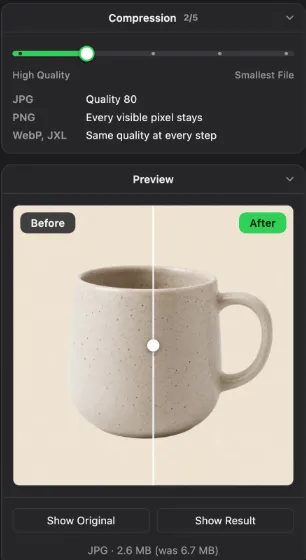
Image compressors compared, for one photo or a whole folder
AwaCut (Compress Images)
- Runs on
- Mac, Windows, Linux
- Good to know
- Free, no limit. Whole folders, nothing uploaded, originals kept
ImageOptim
- Runs on
- Mac
- Good to know
- Free and open source. Lossless by default, lossy as an option
Squoosh
- Runs on
- Browser
- Good to know
- Free, one photo at a time, works in the browser without uploading
TinyPNG
- Runs on
- Browser
- Good to know
- Uploads your photos. 20 at a time on the free plan
Preview
- Runs on
- Mac, built in
- Good to know
- Export as JPEG with a quality slider, one photo or a selection
GIMP 3
- Runs on
- Mac, Windows, Linux
- Good to know
- Free. Export with a quality setting, one photo at a time
| Tool | Runs on | Good to know |
|---|---|---|
| AwaCut (Compress Images) | Mac, Windows, Linux | Free, no limit. Whole folders, nothing uploaded, originals kept |
| ImageOptim | Mac | Free and open source. Lossless by default, lossy as an option |
| Squoosh | Browser | Free, one photo at a time, works in the browser without uploading |
| TinyPNG | Browser | Uploads your photos. 20 at a time on the free plan |
| Preview | Mac, built in | Export as JPEG with a quality slider, one photo or a selection |
| GIMP 3 | Mac, Windows, Linux | Free. Export with a quality setting, one photo at a time |
Checked November 2026. Online tools change their limits often; read the limits before sending client photos.
Mistakes that make compressed photos worse
Compressing the same JPG again and again
Every save of a JPG loses a little. Compress from the original each time, not from a copy you already compressed. AwaCut never writes over the original, so the original is always there.
Going straight to the smallest step
Quality 80 is a good default for photos on a website or in an email. Lower steps show blocks in skies and smooth walls. Look at the preview at 100% before you pick one.
Turning photos into PNG to make them smaller
A photo saved as PNG is usually several times larger than the same photo as JPG. Keep photos in JPG. Use PNG for cutouts and graphics with transparent areas.
Why compress on your own computer
Online compressors are quick for a few photos. For a shoot of 300 product photos, or client photos you should not upload, a desktop compressor is simpler: one drop, one folder out, no limits per day. AwaCut keeps the date and the camera in each compressed photo and removes the location, so you can share the smaller files without sharing where they were taken.
Frequently asked questions
Is AwaCut's image compressor really free?
Yes. Compress Images and Find Duplicates are free in AwaCut, with no limit, no account and no watermark. Only Remove Background and Convert Images need a licence after their 10 free photos.
How do I compress photos without losing quality?
Use the first step of the slider. For JPG it is quality 90, which looks the same as the original; for PNG the first two steps keep every pixel. To compress JPEG photos further, quality 80 is still hard to tell from the original at normal size.
How much smaller do photos get?
In our test, 10 camera JPGs came out 60% smaller at quality 80, the default step, and 71% smaller at quality 70, with no difference you could see side by side. PNG photos without transparency shrink less in the lossless steps, about 10%. PNG cutouts from background removers often shrink by half or more, because they carry hidden colour under the transparent areas.
Can I compress a whole folder of photos at once?
Yes. Drop the folder on Compress Images and every JPG and PNG in it, subfolders included, is compressed in one run. The copies go to a separate folder.
Does compressing change the size in pixels?
No. Compress Images keeps the width and height of every photo and makes the file smaller. To change the size in pixels, use a photo editor or Preview on a Mac.
Can it compress HEIC or AVIF photos?
No. HEIC and AVIF are already compressed formats, and AwaCut leaves them out of the list with a note. To make an iPhone photo smaller, convert it to JPG first with Convert Images (on a Mac), then compress the JPG.
Is there an image compressor for Windows that works offline?
Yes. AwaCut runs on Windows 10 and 11, on Mac and on Linux, and compresses photos with no internet connection. GIMP 3 also works offline, one photo at a time.
How do I batch compress images?
Drop the folder on Compress Images in AwaCut, pick a step and every JPG and PNG in it is compressed in one run, subfolders included, into a separate folder. To compress multiple images you do not need to add them one by one.
Can I compress a photo to an exact size, like 100 KB?
Not to an exact number. You pick a step from High Quality to Smallest File and see the result's size before saving. For a size limit on a form, start at the default step and move to a smaller one until the photo fits.
How do I compress multiple images in JPEG format?
Drop the photos or their folder on Compress Images and pick a step. For JPG the steps are quality 90, 80, 70, 60 and 50, and at the default 80 our camera JPGs came out 60% smaller.
Can I shrink an image online, or change image size online?
Yes: online tools such as Squoosh and TinyPNG shrink the file in the browser, one photo or a few at a time. AwaCut is the desktop way: Compress Images shrinks a whole folder for free, with no upload. It keeps the width and height, so to change the size in pixels use a photo editor or Preview on a Mac.
Is there a photo quality reducer that makes files smaller?
Yes, in steps: Compress Images lowers JPG quality from 90 down to 50 to make each file smaller, and the width and height stay the same. You see the result's size before saving, and it is free with no limit.
How do I optimize images for web pages?
Make the files smaller: Compress Images shrinks a whole folder of JPG and PNG for free, and Convert Images turns them into WebP, which came out 58% smaller than JPG in our test. Neither changes the size in pixels, so start from photos at the width your site shows.
Is there a TinyPNG alternative that works offline?
Yes. TinyPNG uploads your photos; Compress Images in AwaCut works on your own computer, free, with no limit, a whole folder of JPG and PNG at once. Squoosh is free too and works in the browser without uploading, one photo at a time.
Can I compress JPEG format photos for free?
Yes. Compress Images is free with no limit: drop JPEG photos or a whole folder, pick one of five steps, and you see the new size before saving. The photos stay JPEG and keep their width and height.
Compress your next folder of photos
Compress Images is free in AwaCut, with no limit. The same app removes backgrounds and converts formats, with 10 free photos each.
macOS
macOS 13.4+ (Apple silicon)v1.0.7 · 186 MB
Windows
Windows 10 or 11 (64-bit)v1.0.7 · 176 MB
Linux
AppImage (x86-64)v1.0.7 · 263 MB
Signed by AYA MIM S.R.L. If Windows still shows "Windows protected your PC", click More info, then Run anyway.
No AwaCut account. No credits. No uploads. 2 computers per licence, full refund within 14 days.