Convert PNG to JPG, free
PNG to JPG format: three free ways, and a whole folder at once
To convert PNG to JPG for free, open the image and save it in the new format. On a Mac, open it in Preview and choose File, Export, Format: JPEG. On Windows, open it in Paint and choose File, Save as, JPEG picture. On Linux, use GIMP 3 and File, Export As. JPG has no transparency, so transparent areas become a solid colour. For a whole folder, Convert Images in AwaCut converts every file at once and lets you pick that colour.
2 computers per licence. Full refund within 14 days, no reason needed.

- No upload
- Pick the colour behind transparency
- Mac, Windows and Linux
Listed onAlternativeToMicrosoft Store
Mac: Preview
Open the .png in Preview, choose File, Export, set Format to JPEG and move the quality slider. Select several files in the sidebar to export them together.
Windows: Paint
Open the .png in Paint and choose File, Save as, JPEG picture. Paint fills transparent areas for you, and you cannot choose the colour.
A whole folder: AwaCut
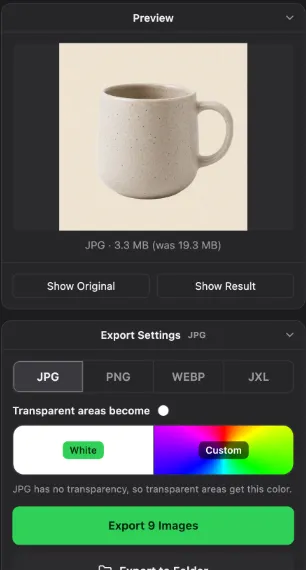
Drop the folder on Convert Images and pick JPG. Under Transparent areas become, choose White or any colour. Every file is converted on your computer.
PNG to JPG converters
Preview
- Runs on
- Mac, built in
- Good to know
- Quality slider, one file or a selection
Paint
- Runs on
- Windows, built in
- Good to know
- One file at a time, no choice of colour behind transparency
GIMP 3
- Runs on
- Mac, Windows, Linux
- Good to know
- Free, one file at a time
ImageMagick
- Runs on
- Mac, Windows, Linux
- Good to know
- Free, command line, easy to loop over a folder
AwaCut (Convert Images)
- Runs on
- Mac, Windows, Linux
- Good to know
- Whole folders, any colour behind transparency. 10 photos free, then a licence
| Tool | Runs on | Good to know |
|---|---|---|
| Preview | Mac, built in | Quality slider, one file or a selection |
| Paint | Windows, built in | One file at a time, no choice of colour behind transparency |
| GIMP 3 | Mac, Windows, Linux | Free, one file at a time |
| ImageMagick | Mac, Windows, Linux | Free, command line, easy to loop over a folder |
| AwaCut (Convert Images) | Mac, Windows, Linux | Whole folders, any colour behind transparency. 10 photos free, then a licence |
Checked November 2026.
Mistakes when converting PNG to JPG
Converting a cutout or a logo
A PNG with a transparent background loses it as JPG. Keep cutouts and logos as PNG, or pick the background colour on purpose.
Converting a screenshot with small text
JPG blurs sharp edges and text a little. Screenshots and diagrams stay sharper and often smaller as PNG.
Converting the same JPG back and forth
Every JPG save loses a little. Convert from the PNG original each time.
Why convert PNG to JPG
PNG keeps every pixel, which is right for graphics and wrong for photos: a photo saved as PNG is often several times larger than the same photo as JPG. Shops, forms and email limits want smaller files, and many upload forms accept JPG only. Converting photos to JPG fixes both.
Try it on your own photos: the first 10 are free, no account.
2 computers per licence. Full refund within 14 days, no reason needed.
Frequently asked questions
How do I convert PNG to JPG on Windows?
Open the file in Paint, choose File, Save as, JPEG picture. For a whole folder, drop it on Convert Images in AwaCut.
What happens to the transparent background?
JPG cannot store transparency, so every converter fills it with a colour. Some give white, some black. AwaCut lets you choose white or any colour before converting.
Does PNG to JPG lose quality?
A little. At a high quality setting a photo looks the same; text and sharp lines show the loss first.
Can I convert many PNG files to JPG at once?
Yes. Convert Images in AwaCut converts a whole folder in one run on Mac, Windows and Linux. With ImageMagick: for f in *.png; do magick "$f" "${f%.png}.jpg"; done.
Convert a folder of PNG files to JPG
Convert Images has 10 free photos on each computer, then one yearly licence for as many photos as you want, with Remove Background included.
macOS
macOS 13.4+ (Apple silicon)v1.0.7 · 186 MB
Windows
Windows 10 or 11 (64-bit)v1.0.7 · 176 MB
Linux
AppImage (x86-64)v1.0.7 · 263 MB
Signed by AYA MIM S.R.L. If Windows still shows "Windows protected your PC", click More info, then Run anyway.
No AwaCut account. No credits. No uploads. 2 computers per licence, full refund within 14 days.