Offline background remover for Windows
An offline background remover for your Windows PC
AwaCut removes backgrounds on your Windows PC with no internet connection. Drop a whole folder and every photo is cut on your computer, with nothing uploaded. The AI model is in the installer, so there is no Python to set up and no model to download, and it needs no graphics card. 10 photos free, then $29 a year for as many as you want. Free offline tools exist too, and they are in the table below.
2 computers per licence. Full refund within 14 days, no reason needed.
- Works with no internet
- No Python, no graphics card
- Windows 10 and 11, 64-bit
Listed onAlternativeToMicrosoft Store
Install it once
Download the installer, or get AwaCut from the Microsoft Store. It is signed by AYA MIM S.R.L. and the AI model is already inside, so nothing else downloads later.
Turn off Wi-Fi, if you want to be sure
The 10 free photos need no account. After you buy, a licence key is activated online once. From then on, removing backgrounds needs no connection.
Drop a folder
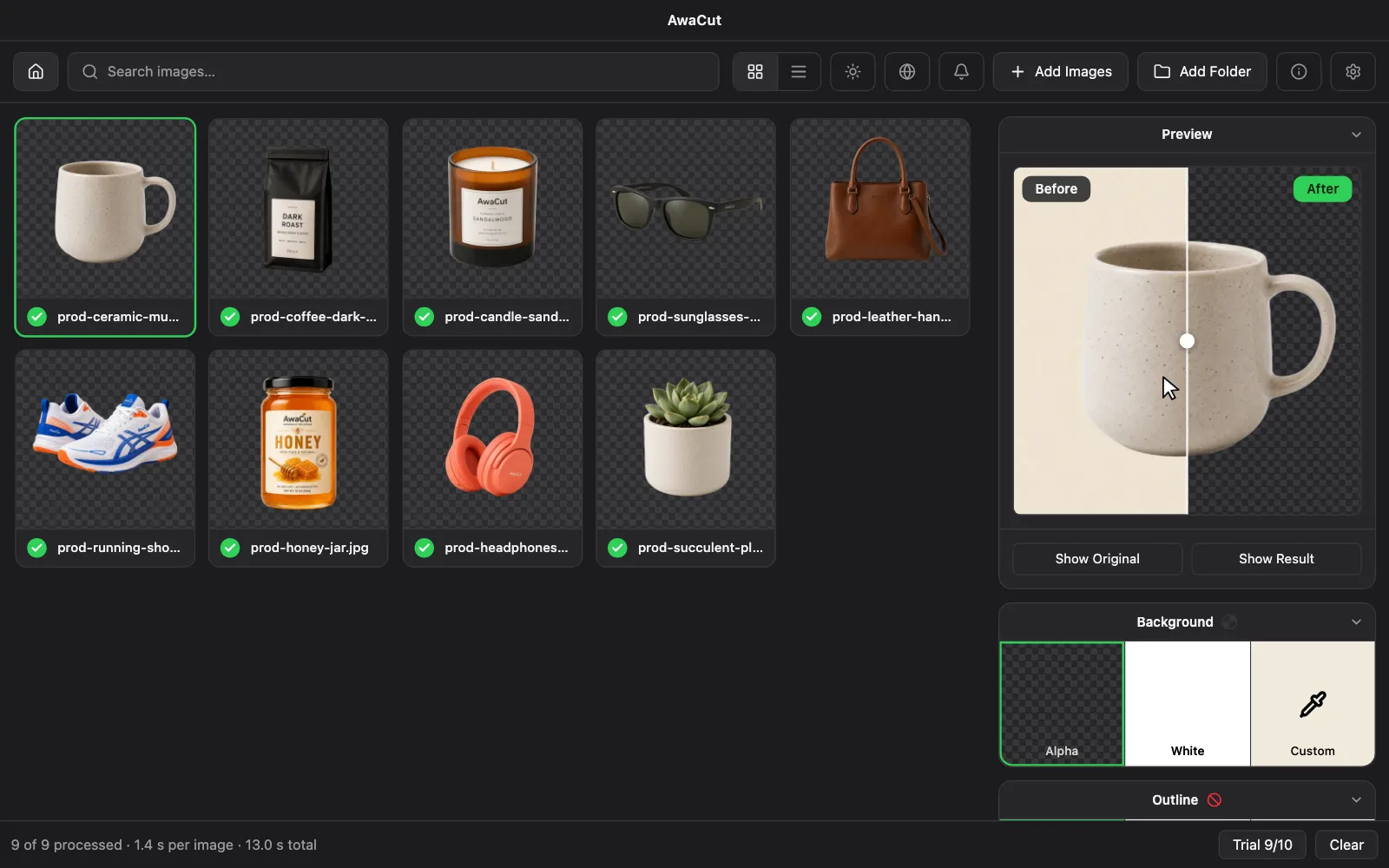
Drag a folder onto AwaCut and pick Alpha for transparent, White, or any colour. Each cutout is saved at the original size as soon as it is ready, to a separate folder.
Offline background removers for Windows, side by side
AwaCut
- What you install and pay
- One signed installer with the model inside. 10 photos free, then $29 a year.
- Good to know
- Works with no internet from the first launch. Whole folders, as many photos as you want. No command line, one built-in model.
BG Remove
- What you install and pay
- Free. A Windows installer of about 340 MB with its models inside.
- Good to know
- Works with no internet from the first launch. Folders and subfolders.
TomsBGRemover
- What you install and pay
- Free. A portable Windows app with no account.
- Good to know
- Batch processing of a folder, plus sticker borders. Several AI engines and visible settings to adjust.
Unbagrnd
- What you install and pay
- Free and open source. A desktop app.
- Good to know
- Single photos or whole folders. The model downloads on first use, so the first run needs internet.
rembg
- What you install and pay
- Free and open source. Python and pip, or a command-line installer.
- Good to know
- Cuts a folder with one command and suits scripts. Models download on first use. Its default model needs a paid agreement for commercial use, so choose another if you sell the results.
LocalBG
- What you install and pay
- Free for one image at a time. Folders are in Pro, from €8 a month excl. VAT.
- Good to know
- Also handles video and GIF, and has more AI models and a command line.
BG Remover
- What you install and pay
- Free for up to 5 images per batch. Pro is $7.99 a month or $99 once.
- Good to know
- Several AI models, optional graphics card acceleration, and manual erase and restore tools.
| Tool | What you install and pay | Good to know |
|---|---|---|
| AwaCut | One signed installer with the model inside. 10 photos free, then $29 a year. | Works with no internet from the first launch. Whole folders, as many photos as you want. No command line, one built-in model. |
| BG Remove | Free. A Windows installer of about 340 MB with its models inside. | Works with no internet from the first launch. Folders and subfolders. |
| TomsBGRemover | Free. A portable Windows app with no account. | Batch processing of a folder, plus sticker borders. Several AI engines and visible settings to adjust. |
| Unbagrnd | Free and open source. A desktop app. | Single photos or whole folders. The model downloads on first use, so the first run needs internet. |
| rembg | Free and open source. Python and pip, or a command-line installer. | Cuts a folder with one command and suits scripts. Models download on first use. Its default model needs a paid agreement for commercial use, so choose another if you sell the results. |
| LocalBG | Free for one image at a time. Folders are in Pro, from €8 a month excl. VAT. | Also handles video and GIF, and has more AI models and a command line. |
| BG Remover | Free for up to 5 images per batch. Pro is $7.99 a month or $99 once. | Several AI models, optional graphics card acceleration, and manual erase and restore tools. |
Read on each tool's own website on 31 October 2026 (rembg, Unbagrnd and BG Remove on 19 October). They change often; if a line is out of date, write to us and we will correct it. We make AwaCut.
Three things to check before you trust an offline tool
A model that downloads later
Many "offline" apps fetch the AI model on first use, so the first run needs internet. To test it, turn off Wi-Fi before the very first cut.
A web page that still uploads
Some web tools call themselves local but send each photo to a server. Others do run in the browser, where tab memory limits the size of a batch. An installed app has neither problem.
Licences for commercial work
A free tool is not always free for business. Each AI model has its own licence, so check it if you sell the results. AwaCut's model, BiRefNet general-lite, is MIT-licensed and allows commercial use.
Why people want this offline on Windows
Client photos, confidential products, ID pictures, or just a slow connection: an upload is either not allowed or not worth waiting for. With everything on your own PC there is no upload queue and no server to trust. A faster processor finishes a folder sooner, and you can leave it running while you do something else.
Try it on your own photos: the first 10 are free, no account.
2 computers per licence. Full refund within 14 days, no reason needed.
Frequently asked questions
Is there a background remover that works offline on Windows?
Yes. AwaCut runs on Windows 10 and 11 (64-bit) with the AI model inside the installer, so it works with no internet from the first launch and cuts whole folders. 10 photos are free, then it is $29 a year. BG Remove and TomsBGRemover are free offline Windows apps, and rembg is free if you are comfortable with Python.
Can I remove backgrounds on Windows without uploading my photos?
Yes. Use a program that runs the AI on your own PC. AwaCut does, so your photos never leave the computer and are never used to train AI.
Does it need a graphics card?
No. AwaCut runs on the processor, so it works on a PC with no dedicated graphics card. A faster processor finishes a folder sooner.
Do I need Python or the command line?
No. AwaCut is a normal Windows app with one installer. Drag a folder onto the window and it starts. If you do want scripts or your own model, rembg is the better fit.
Does AwaCut need the internet at all?
Not to remove backgrounds. It goes online to activate the licence once, recheck it about every 30 days, look for updates, load the in-app news and tutorials, and send anonymous usage counts, never images or file names. If you are offline when a check is due, it keeps working. An activated app never locks.
Which versions of Windows does it run on?
Windows 10 and 11, 64-bit (x64). One licence covers 2 computers, in any mix of Windows, Mac and Linux.
Why pay if free offline tools exist?
If a free tool cuts your photos well, use it. AwaCut is for when you want one signed installer, whole folders with no settings to learn, a model licensed for commercial work, and updates and support. The first 10 photos are free at full resolution, so run the same hard photos through both and compare.
Try it with Wi-Fi off
Install AwaCut, turn off Wi-Fi and cut 10 photos for free, at full resolution, with no account.
macOS
macOS 13.4+ (Apple silicon)v1.0.7 · 186 MB
Windows
Windows 10 or 11 (64-bit)v1.0.7 · 176 MB
Linux
AppImage (x86-64)v1.0.7 · 263 MB
Signed by AYA MIM S.R.L. If Windows still shows "Windows protected your PC", click More info, then Run anyway.
No AwaCut account. No credits. No uploads. 2 computers per licence, full refund within 14 days.