AwaCut для AI-зображень
Видалити фон з AI-зображень, зі справжнім прозорим PNG
Перетягніть папку із зображеннями з ChatGPT, Gemini чи Midjourney. AwaCut вирізає кожен об'єкт і експортує справжній прозорий PNG, приблизно 4 секунди на зображення на Mac Studio (M4 Max), офлайн. Без намальованої шахівниці, без завантаження в мережу.
2 комп'ютери на ліцензію. Повне повернення коштів протягом 14 днів, без пояснення причин.


- Працює офлайн
- Без облікового запису, без завантаження в мережу
- Скільки завгодно фото, увесь рік
Представлено наAlternativeToMicrosoft Store
Як зробити прозорий фон для AI-зображень
Три кроки в AwaCut, однакові для одного зображення і для цілої папки генерацій.
Перетягніть папку з генераціями
Збережіть зображення як PNG, JPG або WebP в одну папку й перетягніть її. Сотні стають у чергу за раз, приблизно 4 секунди на кожне на Mac Studio (M4 Max).
Залиште фон на «Альфа»
«Альфа» записує у файл справжню прозорість. Або оберіть «Білий» чи «Власний» колір і додайте «Контур» для дизайнів стікерів.
Отримайте справжні прозорі PNG
PNG або WebP зі справжнім альфа-каналом, збережені у вашу папку, щойно кожне зображення готове, у розмірі, який дав генератор, готові для Canva, Figma, Photoshop чи мокапу друку на замовлення.
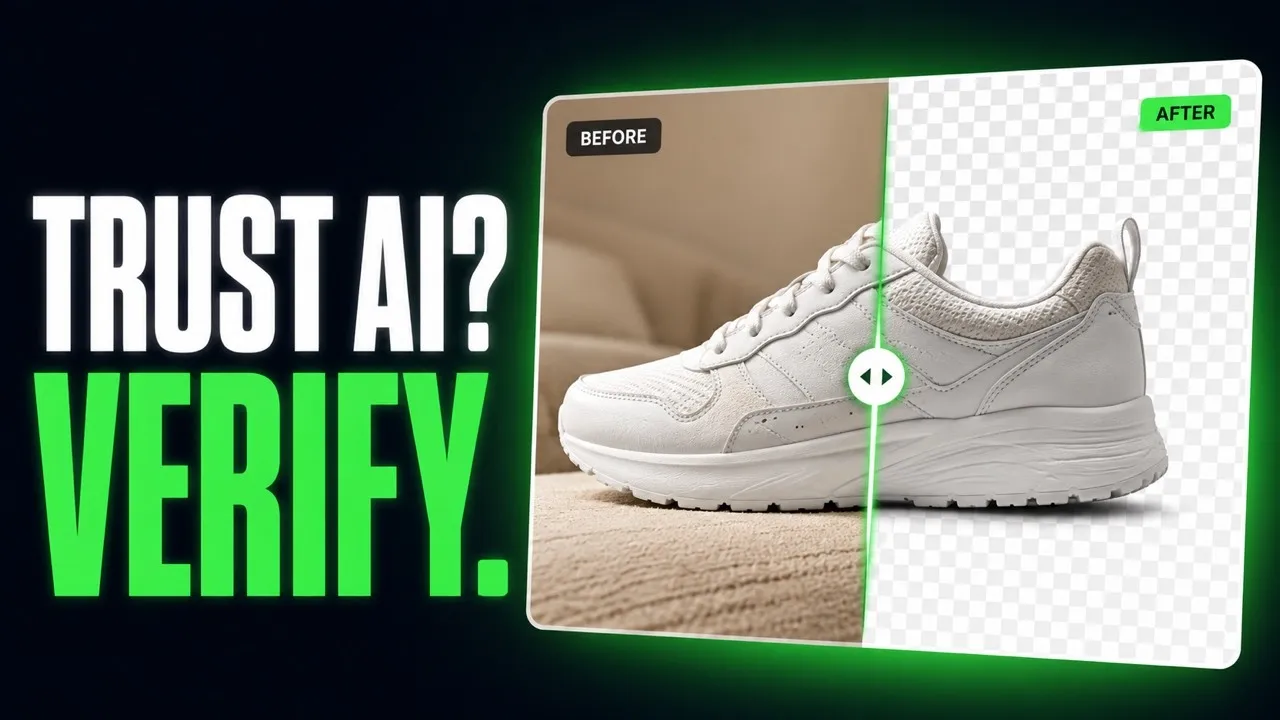
Від фальшивого PNG до справжньої прозорості, просто з AwaCut
Зображення, згенеровані ШІ, вирізані програмою. Без ретушування.


Прозорий фон з ChatGPT чи Nano Banana: три поради
Три речі, від яких залежить, наскільки чистим вийде вирізання AI-зображення.
Просіть простий фон
Просіть у промпті об'єкт на простому однотонному фоні. Чіткий край між об'єктом і фоном дає найчистіше вирізання.
Як розпізнати фальшивий PNG: намальована шахівниця
Відкрийте файл на темному фоні в будь-якому редакторі. Якщо сірі й білі квадрати досі там, їх намальовано в пікселях. Проженіть файл через AwaCut, і об'єкт вийде на справжній прозорості.
Збільште перед вирізанням
AwaCut зберігає розмір, який отримує: зображення на 1024 пікселі повертається з 1024 пікселями. Для друку спершу збільште, потім вирізайте, щоб край утворився у фінальному розмірі.
Чому не попросити прозорість у генератора?
Деякі генератори вміють експортувати прозорість, багато досі малюють шахівницю, і це змінюється від оновлення до оновлення. AwaCut це один незмінний крок після будь-якого генератора: ціла папка за раз, без інтернету, скільки завгодно зображень, цілий рік, за 29 USD на рік.
2 комп'ютери на ліцензію. Повне повернення коштів протягом 14 днів, без пояснення причин.
Питання про AI-зображення і прозорість
Про фальшиві PNG, генератори, розмір для друку і ціну. Немає відповіді? Напишіть на contact@aya.software, відповість людина.
Чому прозорість з AI-генераторів виглядає фальшивою?
Часто тому, що вона й справді фальшива: багато генераторів малюють шахівницю в пікселях замість справжнього альфа-каналу. AwaCut проганяє зображення через модель сегментації й експортує PNG зі справжньою прозорістю, яка працює в будь-якому редакторі.
З якими AI-генераторами це працює?
З будь-якими, що зберігають PNG, JPG або WebP: ChatGPT, Gemini, Midjourney, Firefly, Stable Diffusion чи будь-що інше. Покладіть їх в одну папку, і вони обробляться одним пакетом.
Чи збережуться дрібні деталі, як-от волосся на AI-портретах?
Волосся і тонкі краї це саме те, для чого створено модель. Спробуйте свій найдетальніший портрет у безкоштовній пробній версії й оцініть край у режимі «До» і «Після».
Чи можна продавати дизайни, зроблені з вирізаних зображень?
AwaCut не додає ні водяного знака, ні власних обмежень: експорти можна використовувати комерційно. Що можна робити із самим згенерованим зображенням, визначають умови генератора.
Чи будуть мої AI-зображення чіткими при друку?
Вирізане зображення зберігає розмір того, що отримує, нічого не зменшується. Генератори часто видають невеликі файли, тож для друку спершу збільште, а потім вирізайте.
Чи завантажуються мої зображення в мережу або для навчання ШІ?
Ні. Видалення фону працює на вашому комп'ютері, офлайн. Зображення ніколи не завантажуються в мережу і ніколи не використовуються для навчання ШІ, а облікового запису немає.
Скільки зображень можна обробити?
Скільки завгодно, цілий рік, за фіксовані 29 USD на рік. Перші 10 безкоштовні, у повній роздільності, без водяного знака.
Чи працює на Windows і Mac?
Так. AwaCut працює на macOS 13.4 або новішій (Apple silicon), Windows 10 або 11 (64-bit) і Linux, а одна ліцензія охоплює 2 комп'ютери. Видалення фону працює на самому комп'ютері, тож і офлайн теж.
Спробуйте на власних фото
Завантажте AwaCut і виріжте 10 фото безкоштовно. Без облікового запису, без картки, без водяного знака. Порівняйте вирізання самі.
macOS
macOS 13.4+ (Apple silicon)
v1.0.6 · 194 MB
macOSПрограма для видалення фону на MacWindows
Windows 10 or 11 (64-bit)
v1.0.6 · 180 MB
WindowsПрограма для видалення фону на WindowsLinux
AppImage (x86-64)
v1.0.6 · 268 MB
LinuxПрограма для видалення фону на Linux
Підписано AYA MIM S.R.L. Якщо Windows ще показує «Windows захистив ваш ПК», натисніть «Докладніше», а потім «Усе одно запустити».
Без облікового запису AwaCut. Без кредитів. Без завантаження в мережу. 2 комп'ютери на ліцензію, повне повернення коштів протягом 14 днів.